English
 français
 Deutsch
 Español
 italiano
 русский
 português
 中文
中文
×
What Should Be Considered Before Selecting an Industrial Panel PC?
After more than ten years working on industrial automation projects, I have encountered many equipment selection cases where the biggest problems were not caused by control logic or software design, but by choosing the wrong industrial computing terminal.
Many companies initially treat an industrial panel PC as simply a “larger tablet computer.” However, industrial environments are completely different from office or consumer applications.
A factory floor may involve metal dust, oil contamination, water spray, continuous vibration, electromagnetic interference, and wide temperature variations. In many production environments, equipment is expected to operate continuously for long periods, sometimes 16 or even 24 hours a day.
At the same time, operators rely on industrial panel PCs to perform critical tasks such as:
Monitoring production data;
Adjusting machine parameters;
Controlling equipment operations;
Collecting production information;
Communicating with PLCs and industrial devices.
Therefore, industrial panel PCs should never be selected using the same criteria as commercial tablets.
Only after understanding these factors can we select an industrial panel PC that truly fits the application.
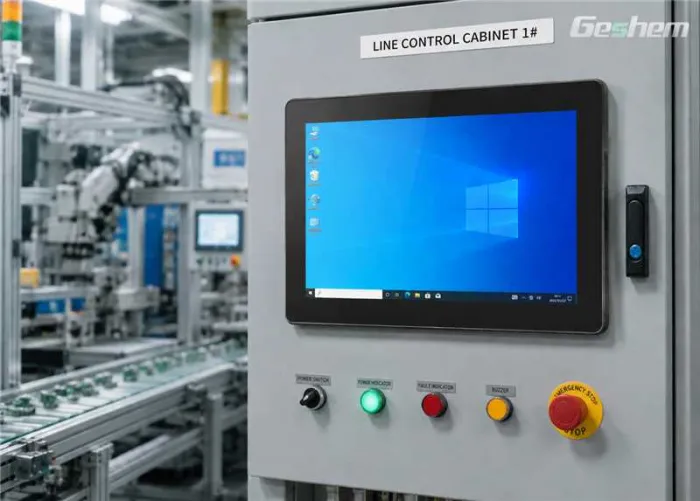
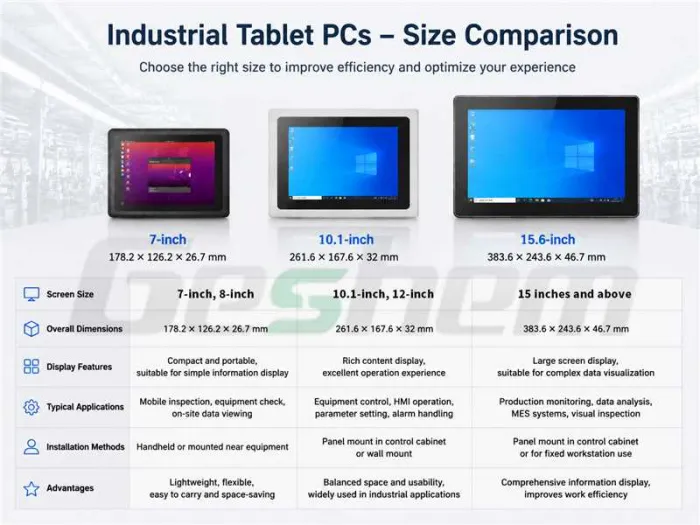
The choice of screen size is actually a balance between information display, installation space, and operator usability.
Small-size industrial panel PCs are commonly used for equipment inspection, maintenance operations, and local machine control.
For example, maintenance engineers working on a large production line may need to carry a device between multiple stations to check PLC status, review alarms, or record maintenance information.
In these situations, compact size provides better mobility.
However, smaller screens are not suitable for complex HMI applications. If operators need to view trend charts, alarm lists, machine status, and multiple control windows simultaneously, a 7-inch or 8-inch display can quickly become crowded.
For machine automation, equipment control, and human-machine interface applications, 10.1-inch and 12-inch industrial panel PCs are among the most widely used sizes.
They provide a good balance between installation space and operating comfort.
These sizes are commonly installed on:
Packaging machines;
Inspection equipment;
Robot workstations;
Automated production equipment.
Operators can easily modify parameters, monitor machine conditions, and respond to alarms.
Large-screen industrial panel PCs are typically used for:
Production monitoring stations;
MES data displays;
SCADA systems;
Industrial visualization terminals.
When operators need to display multiple information windows, including production status, quality data, historical trends, and equipment information, larger screens provide significant advantages.
However, bigger is not always better.In actual projects, we have seen customers choose oversized displays only to discover that the control cabinet has insufficient space or the viewing distance is too close for comfortable operation.
The correct screen size should always match the actual installation environment.
When selecting the CPU for an industrial panel PC, the key factor is not simply the processor model or benchmark score.The actual workload determines the required performance level.
For basic applications such as:
Data acquisition;
PLC communication;
Simple HMI visualization;
Equipment status monitoring;
The CPU requirements are usually moderate.In these cases, low power consumption and long-term stability are often more important than maximum processing power.
However, if the industrial panel PC needs to run more demanding applications, such as:
Advanced SCADA systems;
Machine vision software;
Edge computing applications;
Database services;
Multiple industrial software platforms simultaneously;
A higher-performance CPU platform becomes necessary.
In modern smart manufacturing projects, one industrial panel PC may need to handle multiple tasks at the same time:
Communicating with PLC controllers;
Running HMI software;
Storing production data;
Connecting to databases;
Processing inspection results.
Insufficient CPU performance can lead to slow screen response, delayed data updates, or unstable operation.
However, industrial CPU selection is different from consumer computer selection.
We pay more attention to:
Long-term product availability;
Power consumption;
Thermal design;
Industrial lifecycle support.
Many customers choose consumer-grade processors because they appear cost-effective at the beginning. However, several years later, they may face problems such as discontinued components, driver compatibility issues, or difficult maintenance.
Memory capacity directly affects system stability when running multiple industrial applications.
For simple HMI software, PLC communication, and basic data collection tasks, 4GB RAM can usually meet requirements.
Typical applications include:
Machine status display;
Basic parameter adjustment;
Simple operator controls.
For many automation projects, 8GB RAM has become a common configuration.
It can support:
Industrial HMI software;
Communication applications;
Background monitoring services;
Basic database functions.
For applications involving:
Machine vision;
Edge computing;
Large databases;
Multiple software systems running simultaneously;
16GB or higher memory is usually recommended.
A common issue in real production environments is that the system works well during initial deployment but becomes slower after months or years of operation.
In many cases, the problem is not CPU performance but insufficient memory caused by increasing data volume and software expansion.
Therefore, industrial panel PC selection should consider future requirements, not only current operation.
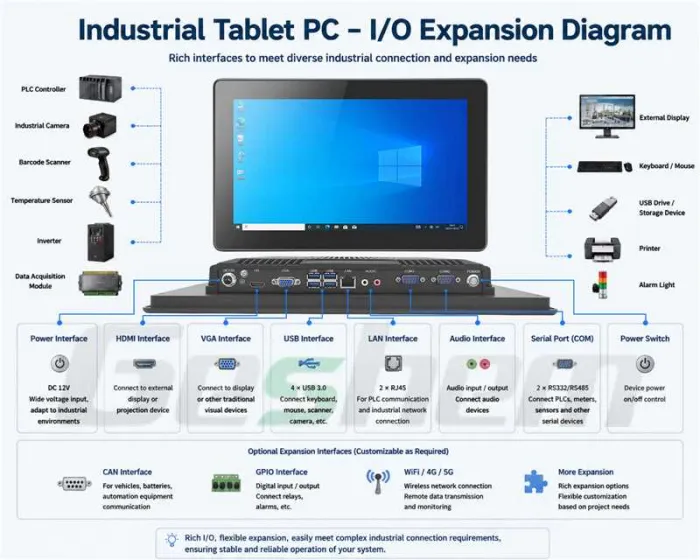
Industrial environments require much more connectivity than office applications.
An industrial panel PC may need to connect with:
PLC controllers;
Industrial cameras;
Barcode scanners;
Sensors;
Inverters;
Data acquisition modules.
Common industrial interfaces include:
USB: For scanners, cameras, keyboards, and external devices;
RS232/RS485: For communication with traditional industrial equipment and instruments;
Ethernet: For PLC communication and industrial networks;
HDMI: For external displays;
CAN bus: For automotive and industrial communication applications.
In many equipment upgrade projects, customers discover too late that the original system lacks enough interfaces for future expansion.
For example, adding barcode scanning, vision inspection, or additional sensors may require extra communication ports.
Using too many adapters increases complexity and reduces system reliability.
From an engineering perspective, interface planning should be considered during the initial system design stage.
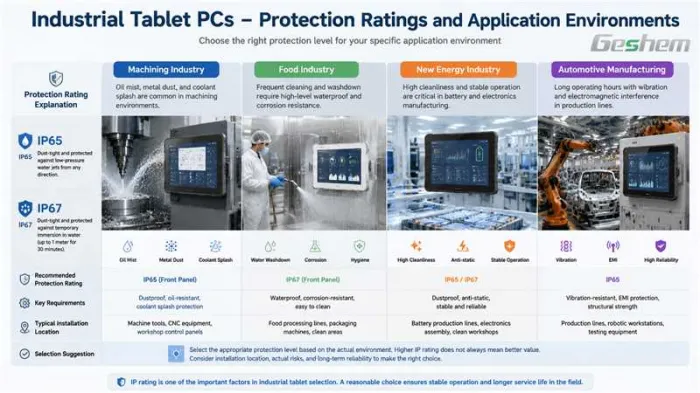
Protection ratings such as IP65 and IP67 are important considerations for industrial panel PCs.
However, choosing the right protection level requires understanding the actual working environment.
Machine shops often involve:
Metal dust;
Oil mist;
Cutting fluid splash;
Mechanical vibration.
These applications require strong sealing structures and resistance to contamination.
Food production environments often require frequent equipment cleaning.
Water resistance, corrosion resistance, and easy-to-clean surfaces become important factors.
Battery manufacturing and electronics production usually require:
High reliability;
Clean operating environments;
Stable long-term operation.
Automotive production lines typically operate continuously and may involve:
Mechanical vibration;
Electromagnetic interference;
Complex automation systems.
Protection rating is important, but structural design and reliability are equally critical.
Many customers assume that a higher IP rating is always better. However, excessive protection capability may not provide additional value if the device is installed inside a protected control cabinet.
The right approach is to select protection according to the real factory environment.
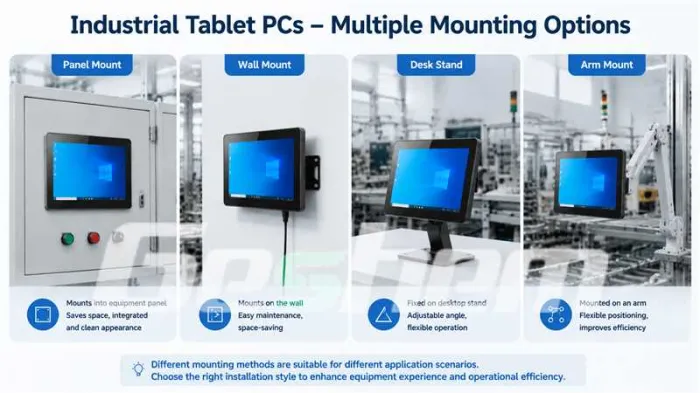
The installation method of an industrial panel PC directly affects cooling performance, maintenance convenience, and operator experience.
Commonly used in:
Control cabinets;
Machine panels;
Automation equipment.
Advantages:
Clean appearance;
Space-saving;
Suitable for fixed operation.
However, cabinet ventilation and heat dissipation must be considered carefully.
Suitable for:
Production lines;
Factory workstations;
Equipment monitoring points.
It provides convenient access for operators and maintenance teams.
Often used for:
Inspection stations;
Laboratory equipment;
Small automation systems.
The viewing angle can be adjusted easily.
Commonly used for:
Large machinery;
Production line operator stations.
It allows flexible positioning based on operator requirements.
In many projects, customers focus only on whether the device can physically fit the installation location.
However, long-term operation depends on additional considerations:
Is maintenance easy?
Can cables be replaced conveniently?
Is heat dissipation affected?
Can operators use the device comfortably?
Based on years of project experience, several mistakes occur frequently.
Industrial equipment usually operates for many years.
Saving a small amount during purchasing may lead to higher maintenance costs later.
A powerful processor does not guarantee industrial reliability.
Thermal design, power stability, enclosure structure, and lifecycle support are equally important.
Many machines start with simple functions but later require:
Data analysis;
Vision inspection;
MES integration;
Remote monitoring.
Future requirements should be considered during selection.
A device is not finished after installation.
Future maintenance, replacement, and upgrades are part of the total lifecycle cost.
Selecting an industrial panel PC is not simply a hardware purchasing decision. It is part of the overall industrial system design.
In real automation projects, our focus is always:
Can this device operate reliably for years in the factory environment?
Can it handle future expansion?
Can maintenance engineers easily service it?
Meeting technical specifications does not automatically mean a product is suitable for industrial applications.
The right industrial panel PC should be selected based on real requirements:
Appropriate screen size;
Suitable CPU performance;
Sufficient memory;
Reliable industrial interfaces;
Proper protection level;
Correct installation method.
Only by starting from the actual application scenario—not just a specification sheet—can companies select an industrial human-machine interface terminal that is truly reliable.
Shenzhen Geshem Technology Co., Ltd. is a national high-tech enterprise with 14 years of deep industry experience, specializing in the R&D, design, intelligent manufacturing, and sales of industrial computers, industrial panel PCs, and rugged tablets; the company holds a total of 92 authorized patents (including 27 invention patents).